Background
In the third post of this series, I want to talk about unit testing, one of the most important part of the software development I thought.
Creaating a developer-friendly unit testing environment and writing high-quality test cases are both essential for building a robust and maintainable SaaS product. Over time, these practices help ensure your service remains reliable as it grows in complexity.
In this post, I'll not only cover how to write unit tests in Java Spring Boot, but also how to set up a clean and efficient testing environment that makes writing and running tests easier for the whole team.
Installation
Make sure you have this (Spring Boot usually adds it already):
<dependency>
    <groupId>org.springframework.boot</groupId>
    <artifactId>spring-boot-starter-test</artifactId>
    <scope>test</scope>
</dependency>
This includes:
- JUnit 5
- Mockito
- AssertJ
- Spring Test
Next I want to introduce the H2, H2 is a lightweight relational database written entirely in Java. It belongs to a disposable and in-memory database that exists only for your tests. In Spring Boot, H2 lets you test real database behavior without the cost of running MySQL/Postgres.
<dependency>
    <groupId>com.h2database</groupId>
    <artifactId>h2</artifactId>
    <scope>test</scope>
</dependency>
We also need to add the following application setting for our testing environment.
spring:
  datasource:
    url: jdbc:h2:mem:todolist-test;MODE=PostgreSQL
    driver-class-name: org.h2.Driver
    username: sa
    password:

  liquibase:
    enabled: false

  jpa:
    hibernate:
      ddl-auto: create-drop
    show-sql: false
    properties:
      hibernate:
        format_sql: false

logging:
  level:
    root: WARN

    # Spring framework noise
    org.springframework: WARN

    # Hibernate SQL + binding noise
    org.hibernate.SQL: WARN
    org.hibernate.type.descriptor.sql: WARN

    # JPA bootstrap logs
    org.springframework.orm.jpa: WARN
You can change the mode in the database url to your target database, I used the PostgreSQL here. Remenber to add the @ActiveProfiles("test") to the TodolistApplicationTests.java to tell the spring to use the application-test.yml to overwrite the application.yml, which means can load the testing config for unit test.
package com.example.todolist;

import org.junit.jupiter.api.Test;
import org.springframework.boot.test.context.SpringBootTest;
import org.springframework.test.context.ActiveProfiles;

@SpringBootTest
@ActiveProfiles("test")
class TodolistApplicationTests {

	@Test
	void contextLoads() {
	}

}
Implementation
In this section, we will walk through how to write the unit test in Java Spring Boot. In previous posts we have implemented the controller, service and repository part in Spring. Next we will write the unit tests for each of them, here we go:
Repository
package com.example.todolist.repository;

import com.example.todolist.model.Todo;
import org.springframework.data.jpa.repository.JpaRepository;

public interface TodoRepository extends JpaRepository<Todo, Long> {}
package com.example.todolist.model;

import jakarta.persistence.*;
import lombok.Getter;
import lombok.NoArgsConstructor;
import lombok.Setter;

import java.time.Instant;

@Entity
@Table(name = "todolist")
@Getter
@Setter
@NoArgsConstructor
public class Todo {
    @Id
    @GeneratedValue(strategy = GenerationType.IDENTITY)
    private Long id;

    @Column(nullable = false)
    private String title;

    private String description;

    @Column(nullable = false)
    private boolean completed = false;

    // UTC-safe creation timestamp
    @Column(nullable = false, updatable = false,
            columnDefinition = "TIMESTAMP WITH TIME ZONE DEFAULT CURRENT_TIMESTAMP")
    private Instant createdAt = Instant.now();

    // Custom constructor for creating new todos
    public Todo(String title, String description) {
        this.title = title;
        this.description = description;
    }

}We need to define our test plans based the todo model and repository. We are testing:
- JPA entity mapping
- Auto-generated ID
- @Column(nullable = false) constraints
- Default values (completed, createdAt)
- CRUD behavior (save, find, update, delete)
The whole test code for the repository is
package com.example.todolist.repository;

import com.example.todolist.model.Todo;
import org.junit.jupiter.api.Test;
import org.springframework.beans.factory.annotation.Autowired;
import org.springframework.boot.test.autoconfigure.orm.jpa.DataJpaTest;
import org.springframework.test.context.ActiveProfiles;

import java.util.Optional;

import static org.assertj.core.api.Assertions.assertThat;

@DataJpaTest
@ActiveProfiles("test")
class TodoRepositoryTest {

    @Autowired
    private TodoRepository todoRepository;

    @Test
    void shouldSaveAndFindTodo() {
        // Arrange
        Todo todo = new Todo("Write tests", "Learn H2 with Spring Boot");

        // Act
        Todo saved = todoRepository.save(todo);

        // Assert
        assertThat(saved.getId()).isNotNull();
        assertThat(saved.isCompleted()).isFalse();
        assertThat(saved.getCreatedAt()).isNotNull();

        Optional<Todo> found = todoRepository.findById(saved.getId());

        assertThat(found).isPresent();
        assertThat(found.get().getTitle()).isEqualTo("Write tests");
    }

    @Test
    void shouldUpdateTodo() {
        // Arrange
        Todo todo = todoRepository.save(new Todo("Old title", "Old desc"));

        // Act
        todo.setTitle("New title");
        todo.setCompleted(true);
        Todo updated = todoRepository.save(todo);

        // Assert
        assertThat(updated.getTitle()).isEqualTo("New title");
        assertThat(updated.isCompleted()).isTrue();
    }

    @Test
    void shouldDeleteTodo() {
        // Arrange
        Todo todo = todoRepository.save(new Todo("Delete me", "Temp"));

        // Act
        todoRepository.deleteById(todo.getId());

        // Assert
        assertThat(todoRepository.findById(todo.getId())).isEmpty();
    }

    @Test
    void shouldEnforceNotNullConstraint() {
        // Arrange
        Todo todo = new Todo();
        todo.setDescription("Missing title");

        // Act & Assert
        assertThat(org.junit.jupiter.api.Assertions.assertThrows(
            org.springframework.dao.DataIntegrityViolationException.class,
            () -> {
                todoRepository.save(todo);
                todoRepository.flush();
            }
        )).isNotNull();
    }
}
The first thing I want to talk about is package com.example.todolist.repository;, "why in both TodoRepositoryTest.java and TodoRepository.java have package com.example.todolist.repository;? ", and it brings very important concept in the JAVA:
Usually I use the AAA (Triple-A) concept to write the unit test no matter which programming language I used. What Is the AAA (Triple-A) Concept? It’s a test structure pattern, not a framework feature.
“Set up → Do the thing → Check the result”
There are three parts you need to complete in your unit test:
- Arrange
- Act
- Assert
That's why this concept called AAA (Triple-A). Remember, if Arrange, Act, and Assert cannot be clearly separated, reconsider the responsibility of the code being tested.
Now we can run the mvn clean test command to check if the testing works correctly.
➜ mvn clean test
...
...
...
[INFO] Tests run: 1, Failures: 0, Errors: 0, Skipped: 0, Time elapsed: 0.352 s -- in com.example.todolist.TodolistApplicationTests
[INFO]
[INFO] Results:
[INFO]
[INFO] Tests run: 5, Failures: 0, Errors: 0, Skipped: 0
[INFO]
[INFO] ------------------------------------------------------------------------
[INFO] BUILD SUCCESS
[INFO] ------------------------------------------------------------------------
[INFO] Total time:  3.229 s
[INFO] Finished at: 2025-12-13T23:09:29+08:00
[INFO] ------------------------------------------------------------------------
Ok, everything works well now. Next we will complete the unit tests for controller and service.
Service
package com.example.todolist.service;

import com.example.todolist.model.Todo;
import com.example.todolist.repository.TodoRepository;
import org.junit.jupiter.api.Test;
import org.junit.jupiter.api.extension.ExtendWith;
import org.mockito.InjectMocks;
import org.mockito.Mock;
import org.mockito.junit.jupiter.MockitoExtension;

import java.util.List;
import java.util.Optional;

import static org.assertj.core.api.Assertions.assertThat;
import static org.assertj.core.api.Assertions.assertThatThrownBy;
import static org.mockito.ArgumentMatchers.any;
import static org.mockito.Mockito.*;

@ExtendWith(MockitoExtension.class)
class TodoServiceTest {

    @Mock
    private TodoRepository todoRepository;

    @InjectMocks
    private TodoService todoService;

    @Test
    void getAllTodos_shouldReturnAllTodos() {
        // Arrange
        Todo todo1 = new Todo("Task 1", "Desc 1");
        Todo todo2 = new Todo("Task 2", "Desc 2");

        when(todoRepository.findAll()).thenReturn(List.of(todo1, todo2));

        // Act
        List<Todo> result = todoService.getAllTodos();

        // Assert
        assertThat(result).hasSize(2);
        assertThat(result).extracting(Todo::getTitle)
                .containsExactly("Task 1", "Task 2");

        verify(todoRepository).findAll();
    }

    @Test
    void createTodo_shouldSaveAndReturnTodo() {
        // Arrange
        Todo todo = new Todo("New Task", "New Desc");

        Todo savedTodo = new Todo("New Task", "New Desc");
        savedTodo.setId(1L);

        when(todoRepository.save(any(Todo.class))).thenReturn(savedTodo);

        // Act
        Todo result = todoService.createTodo(todo);

        // Assert
        assertThat(result.getId()).isEqualTo(1L);
        assertThat(result.getTitle()).isEqualTo("New Task");
        assertThat(result.isCompleted()).isFalse();

        verify(todoRepository).save(todo);
    }

    @Test
    void updateTodo_shouldUpdateExistingTodo() {
        // Arrange
        Long todoId = 1L;

        Todo existing = new Todo("Old Title", "Old Desc");
        existing.setId(todoId);

        Todo updated = new Todo("New Title", "New Desc");
        updated.setCompleted(true);

        when(todoRepository.findById(todoId)).thenReturn(Optional.of(existing));
        when(todoRepository.save(any(Todo.class))).thenAnswer(invocation -> invocation.getArgument(0));

        // Act
        Todo result = todoService.updateTodo(todoId, updated);

        // Assert
        assertThat(result.getTitle()).isEqualTo("New Title");
        assertThat(result.getDescription()).isEqualTo("New Desc");
        assertThat(result.isCompleted()).isTrue();

        verify(todoRepository).findById(todoId);
        verify(todoRepository).save(existing);
    }

    @Test
    void updateTodo_shouldThrowException_whenTodoNotFound() {
        // Arrange
        Long todoId = 99L;
        Todo updated = new Todo("Doesn't matter", "Nope");

        when(todoRepository.findById(todoId)).thenReturn(Optional.empty());

        // Act + Assert
        assertThatThrownBy(() -> todoService.updateTodo(todoId, updated))
                .isInstanceOf(RuntimeException.class)
                .hasMessage("Todo not found");

        verify(todoRepository).findById(todoId);
        verify(todoRepository, never()).save(any());
    }

    @Test
    void deleteTodo_shouldDeleteById() {
        // Arrange
        Long todoId = 1L;

        doNothing().when(todoRepository).deleteById(todoId);

        // Act
        todoService.deleteTodo(todoId);

        // Assert
        verify(todoRepository).deleteById(todoId);
    }
}First of all, @ExtendWith(MockitoExtension.class) this line tells JUnit 5 to enable Mockito (Required for @Mock / @InjectMocks) support for this test class.
What's the difference between the @Mock and @injectMocks?
|
Annotation |
What it does |
|---|---|
|
@Mock |
Creates a fake object (a mock) |
|
@InjectMocks |
Creates a real object and injects mocks into it |
@Mock, Mockito creates a fake implementation of TodoRepository, no real logic runs unless you explicitly stub it. Example:
when(todoRepository.findAll())
.thenReturn(List.of(todo1, todo2));@InjectMocks, Mockito creates a real instance of TodoService, looks for fields annotated with @Mock then injects them into the service. For example
@InjectMocks
TodoService todoService;
is effectively to
TodoService todoService = new TodoService(mockTodoRepository);For the verify()means "Assert that this method was called on the mock.". Essential for void methods and side effects.
Compared to Django/Python:
|
Python |
Mockito |
|---|---|
|
assert mock.called |
verify(mock) |
|
assert mock.call_count == 1 |
times(1) |
|
assert not mock.called |
never() |
Controller
Here is the unit test code of controller:
package com.example.todolist.controller;

import com.example.todolist.model.Todo;
import com.example.todolist.service.TodoService;
import com.fasterxml.jackson.databind.ObjectMapper;
import org.junit.jupiter.api.Test;
import org.springframework.beans.factory.annotation.Autowired;
import org.springframework.boot.test.autoconfigure.web.servlet.WebMvcTest;
import org.springframework.boot.test.mock.mockito.MockBean;
import org.springframework.http.MediaType;
import org.springframework.test.web.servlet.MockMvc;

import java.util.List;

import static org.hamcrest.Matchers.hasSize;
import static org.mockito.ArgumentMatchers.any;
import static org.mockito.ArgumentMatchers.eq;
import static org.mockito.Mockito.doNothing;
import static org.mockito.Mockito.when;
import static org.springframework.test.web.servlet.request.MockMvcRequestBuilders.*;
import static org.springframework.test.web.servlet.result.MockMvcResultMatchers.*;

@WebMvcTest(TodoController.class)
class TodoControllerTest {

    @Autowired
    private MockMvc mockMvc;

    @MockBean
    private TodoService todoService;

    @Autowired
    private ObjectMapper objectMapper;

    @Test
    void getAllTodos_shouldReturnTodoList() throws Exception {
        // Arrange
        Todo todo1 = new Todo("Task 1", "Desc 1");
        Todo todo2 = new Todo("Task 2", "Desc 2");

        when(todoService.getAllTodos()).thenReturn(List.of(todo1, todo2));

        // Act & Assert
        mockMvc.perform(get("/api/todos"))
                .andExpect(status().isOk())
                .andExpect(jsonPath("$", hasSize(2)))
                .andExpect(jsonPath("$[0].title").value("Task 1"))
                .andExpect(jsonPath("$[1].title").value("Task 2"));
    }

    @Test
    void createTodo_shouldReturnCreatedTodo() throws Exception {
        // Arrange
        Todo request = new Todo("New Task", "New Desc");

        Todo saved = new Todo("New Task", "New Desc");
        saved.setId(1L);

        when(todoService.createTodo(any(Todo.class))).thenReturn(saved);

        // Act & Assert
        mockMvc.perform(post("/api/todos")
                        .contentType(MediaType.APPLICATION_JSON)
                        .content(objectMapper.writeValueAsString(request)))
                .andExpect(status().isOk())
                .andExpect(jsonPath("$.id").value(1L))
                .andExpect(jsonPath("$.title").value("New Task"))
                .andExpect(jsonPath("$.completed").value(false));
    }

    @Test
    void updateTodo_shouldReturnUpdatedTodo() throws Exception {
        // Arrange
        Long todoId = 1L;

        Todo updated = new Todo("Updated Task", "Updated Desc");
        updated.setCompleted(true);
        updated.setId(todoId);

        when(todoService.updateTodo(eq(todoId), any(Todo.class)))
                .thenReturn(updated);

        // Act & Assert
        mockMvc.perform(put("/api/todos/{id}", todoId)
                        .contentType(MediaType.APPLICATION_JSON)
                        .content(objectMapper.writeValueAsString(updated)))
                .andExpect(status().isOk())
                .andExpect(jsonPath("$.title").value("Updated Task"))
                .andExpect(jsonPath("$.completed").value(true));
    }

    @Test
    void deleteTodo_shouldReturnOk() throws Exception {
        // Arrange
        Long todoId = 1L;
        doNothing().when(todoService).deleteTodo(todoId);

        // Act & Assert
        mockMvc.perform(delete("/api/todos/{id}", todoId))
                .andExpect(status().isOk());
    }
}
I want to explain a few common scenarios that are especially useful when writing unit tests.
The first one is:
// Act & Assert
mockMvc.perform(post("/api/todos")
.contentType(MediaType.APPLICATION_JSON)
.content(objectMapper.writeValueAsString(request)))
.andExpect(status().isOk())
.andExpect(jsonPath("$.id").value(1L))
.andExpect(jsonPath("$.title").value("New Task"))
.andExpect(jsonPath("$.completed").value(false));
The logic behind it is "Simulating an HTTP POST request to your controller and asserting the HTTP response."
- mockMvc = a fake HTTP client
- .contentType(MediaType.APPLICATION_JSON) = sets the HTTP header
- .content(objectMapper.writeValueAsString(request)) = set the request body.
- The Assert Chain for couple of
andExpect - .andExpect(jsonPath("$.id").value(1L)) = inspects the JSON response body.
- $ = root object
- $.id = id field
Next one is:
doNothing().when(todoService).deleteTodo(todoId);
It means that "When deleteTodo(todoId) is called on this mock, do nothing.", you can think we mock and method with do nothing.
In this section, I show you how to use the JUnit + Mockito with H2 in memory database to complete the unit tests for the todo list application, and also share the key concept of how to write the good unit test to you. In the next section, I will show you couple of useful command in developing the unit tests.
Command
In this section, I want to show you couple of useful command in developing the unit tests.
- Run the whole unit tests
$ mvn clean test- Run one test class
$ mvn test -Dtest=TodoServiceTest,TodoControllerTest- Run multiple test classes
$ mvn test -Dtest=TodoServiceTest,TodoControllerTest- Run a single test method
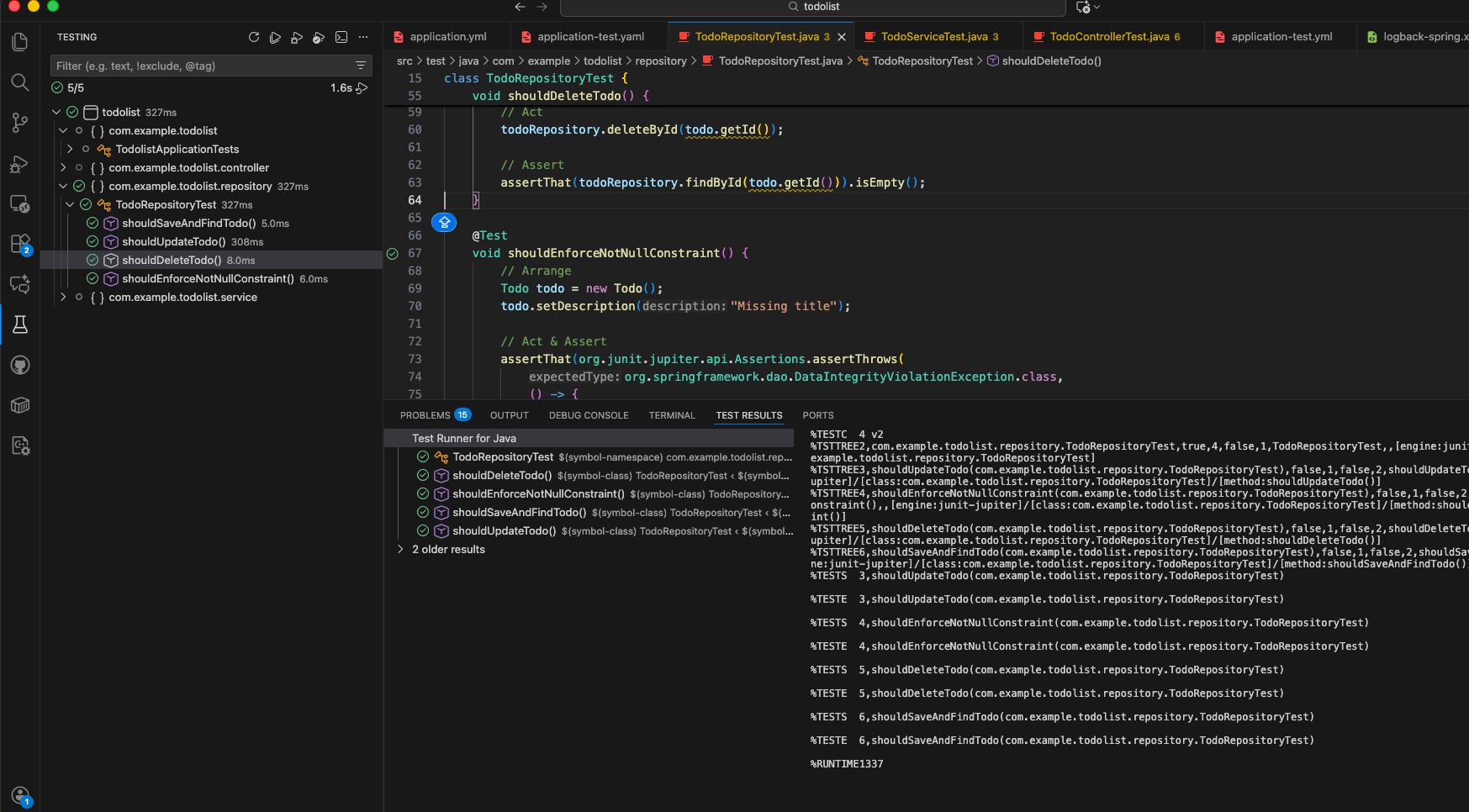
$ mvn test -Dtest=TodoServiceTest#updateTodo_shouldUpdateExistingTodoIf you use the vscode to develop the Java Spring Boot project, you can install the Extension Pack for Java which including the following packages:
- Language Support for Java
- Debugger for Java
- Maven for Java
- Test Runner for Java
And you can navigate to you testing panel in the left side bar to trigger running the unit test via UI.
Takeaway
In this post, I walk you though how to write high-quality unit tests using the Arrange–Act–Assert (AAA) pattern, step by step. Unit testing is a critical part of the modern software development life cycle (SDLC): it helps you validate behavior early, refactor with confidence, and keep regression from slipping into production. By adopting AAA as a consistent testing guideline, you can make your test easier to read, maintain and ultimately make your software projects more reliable over time.